How to Manage Your PTR (Reverse DNS) Records
Overview
Customers with VPS or dedicated server services can now manage their own PTR (reverse DNS) records directly through the client area. This feature allows you to update reverse DNS entries at any time without needing to submit a support ticket.
Accessing the PTR Management Tool
-
Log in to your client area.
-
Navigate to Services and select the VPS or dedicated server you would like to manage.
-
Open the service details page.
-
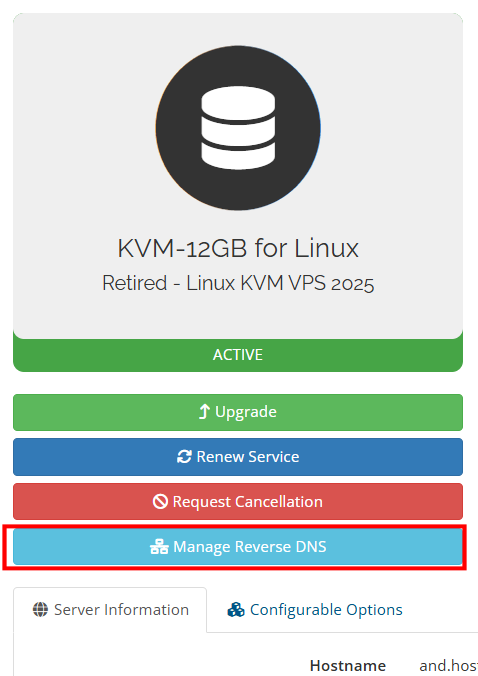
Click the light blue Manage PTR Records button located in the center of the page.
Updating a PTR Record
-
Click Manage PTR Records.
-
Select the IP address you wish to modify.
-
Enter the hostname you would like assigned to that IP address.
-
Save your changes.
For proper operation, the hostname you specify should have a valid forward DNS (A or AAAA) record that resolves back to the same IP address.
Additional Information
-
PTR records are commonly used for mail servers and can help improve email deliverability.
-
Changes to PTR records may take some time to propagate across the Internet.
-
If you encounter any issues or need assistance, please open a support ticket and our team will be happy to help.